// Key takeaways
- AEM Connected Assets Architecture Overview
- Features and Limitations
- What this Connected Assets feature allows you to do:
- Connected Assets Feature Limitations
One of the new interesting features of AEM 6.5 is the ability to set up a connected AEM Assets environment, such that you could browse & use assets from a remote AEM Assets instance on your local AEM Sites instance.
Now that I’ve gotten a chance to set this up and watch it go, I wanted to give a brief overview of how to set it up, as well as caveats on what it can & can’t do.
AEM Connected Assets Architecture Overview
What this new Connected Assets topology allows you to do, is to separate out your DAM repository from your AEM Sites author, so that your Assets instance can specifically be built around handling bulk assets, and your sites author can be optimized around a great authoring & publishing experience.
Diagram
Here’s how it looks in a very crude diagram:
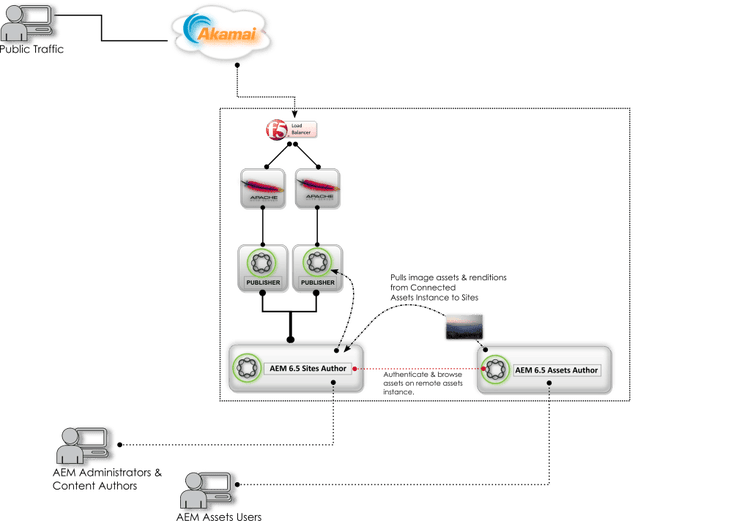
Diagram of AEM 6.5 Connected Assets instances
Basically, all you need is two AEM 6.5 Author instances, hosted either in the cloud, on-premise, or at Adobe Managed Services. Adobe says in their documentation that it will only work on an Assets instance that’s hosted in AMS, but it will in fact work anywhere.
Once set up, one can author a page on the AEM Sites instance, and then when pulling in assets for a page, one can select either to browse assets hosted in the local AEM instance, or to optionally browse the connected DAM instance and search for assets there.
Features and Limitations
What this Connected Assets feature allows you to do:
- Connect as many Sites Authors as you want to a single Assets author
- On a Sites Author, one can browse & search image assets on a remote Assets author
- One can then drag & drop assets from the remote Assets author onto your page, which will automatically download them onto the Sites Author
Connected Assets Feature Limitations
- This feature supports images only. It will not allow you to sync video assets, PDFs, content fragments, experience fragments, dynamic media and the like. So, realize that if the driver for using this feature involves video or PDF assets, this feature isn’t written to support this use case at this time.
- Local assets on the AEM Sites instance don’t get synchronized with the original assets on the remote Assets instance. Any edits, deletions, or revoking of permissions on the DAM instance are not propagated back downstream – they would only get saved to the local copy.
- Local asset copies on the Sites instance are meant to be read-only copies. Only non-destructive edits are permitted that are allowed by the Sites components.
- Locally fetched assets are available for authoring purposes only. Asset update workflows cannot be applied and metadata cannot be edited. That work is meant to be done on the original Assets Author.
- All Sites Authors have read permissions on the fetched copies, even if they do not have access to the remote DAM instance.
- There is presently no API support to customize the Connected Assets integration.
Setting up Connected Assets
This page on Adobe’s helpx site describes how to set up Connected Assets.
The only caveat is that it notes on the documentation that it requires that the Assets Author be hosted in Adobe Managed Services, which it does not. The screenshots & data below were done on a local development environment, so it does entirely work on self-hosted installations as well.
What it Looks Like In Action
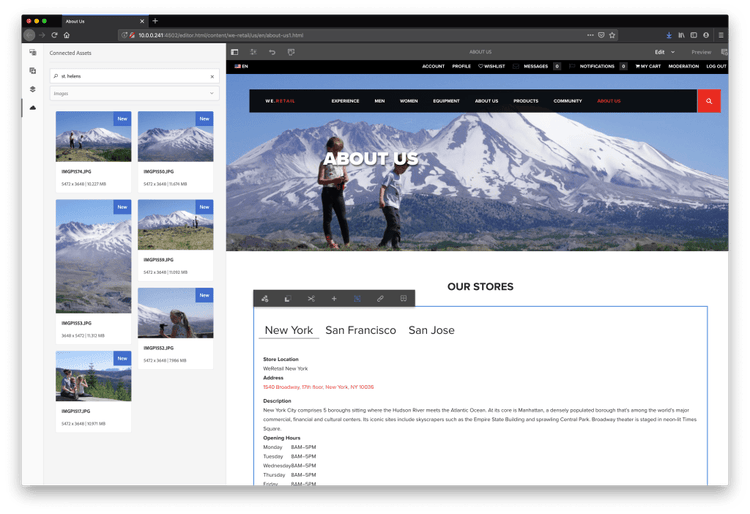
Searching remote assets, this time including my family’s trip to Mt. St. Helens.
The screenshot above shows an AEM 6.5 Sites instance that has been connected to an AEM 6.5 Assets instance. I’ve uploaded & manually tagged a few hundred assets in the AEM 6.5 Assets instance, and then created a page in the We.Retail sample site. Clicking on the “Cloud” icon in the sidebar will connect to the remote Assets instance and start displaying images from the remote instance.
The images are simply fetched & displayed on the page, but are not persisted locally at this point. However, as soon as you select an image and click & drag it into a container on the page, you’ll see this in the logs:
20.06.2019 10:40:57.640 INFO [10.0.0.169 [1561052457600] POST /libs/dam/remoteassets/fetch.html HTTP/1.1] com.adobe.cq.remotedam.internal.assetfetch.services.impl.AssetFetchServiceImpl Fetching [/content/dam/test-assets/IMGP1574.JPG] without original
20.06.2019 10:40:57.876 INFO [10.0.0.169 [1561052457600] POST /libs/dam/remoteassets/fetch.html HTTP/1.1] com.adobe.cq.remotedam.internal.assetfetch.proxy.impl.RemoteDAMProxy Service Successfully fetched package for [/content/dam/test-assets/IMGP1574.JPG]
20.06.2019 10:40:58.110 INFO [10.0.0.169 [1561052457600] POST /libs/dam/remoteassets/fetch.html HTTP/1.1] com.adobe.cq.remotedam.internal.assetfetch.services.impl.AbstractFetchAsset Streamed 421783 bytes of content-package to FetchedAssetsArtifacts9413781294683832586.zip
20.06.2019 10:40:59.080 INFO [10.0.0.169 [1561052457600] POST /libs/dam/remoteassets/fetch.html HTTP/1.1] com.adobe.cq.remotedam.internal.assetfetch.servlets.FetchAssetServlet Fetching [/content/dam/test-assets/IMGP1574.JPG] without original rendition; size of original rendition: 10719663 bytes
Then, once it’s fetched a content package of the image renditions it needs for the Asset, you’ll then be able to see the asset persisted locally in the repository as a read-only copy under /content/dam/connectedassets/
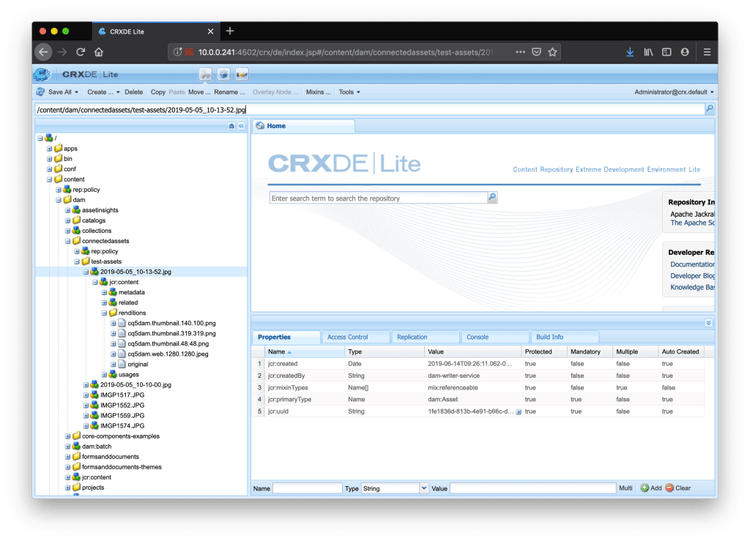
This asset will then be what is activated with the page when it gets Published.
Hope for the Future
This is a very exciting new feature, and I have great hope that Adobe will continue to develop it, and add in other asset types aside from images. The ultimate use case for this would be to be able to fully offload 100% of your Asset processing to a heavy-lifting Asset author, which could then be able to deal with all of your I/O heavy Asset content.
Please let me know if or how you plan to use this feature in your deployments!
// Related reading
-
Field Experiment · LLM
Testing GEO/SEO with Adobe LLM Optimizer
Read the experiment →
-
Field Notes · DevOps
Tailing and viewing Adobe Cloud Manager build logs
Read the runbook →