Adobe Experience Manager is a complex, high-end content and asset management platform that many of the largest brands in the world trust to run their massive marketing websites. As such, stake-holders in the enterprise are rightly concerned over AEM’s availability, and what the options are for architecting AEM so that it will weather high-stress / high-traffic period, but also to be designed to handle a serious physical or software disaster.
As the topics of “DR” and “clustering” come up in literally every single discussion I’ve had around architecting an AEM environment, I wanted to discuss these topics at some length in hopes that it might help you come to a decision about how you want to approach this with your company.
AEM Disaster Recovery – what Disasters are you Planning for?
To make a disaster recovery plan, you need to decide what classes of “disaster” you are trying to plan for. In times past, “disaster” might have only meant “my server caught fire” or “my building permanently lost power” or something of this nature.
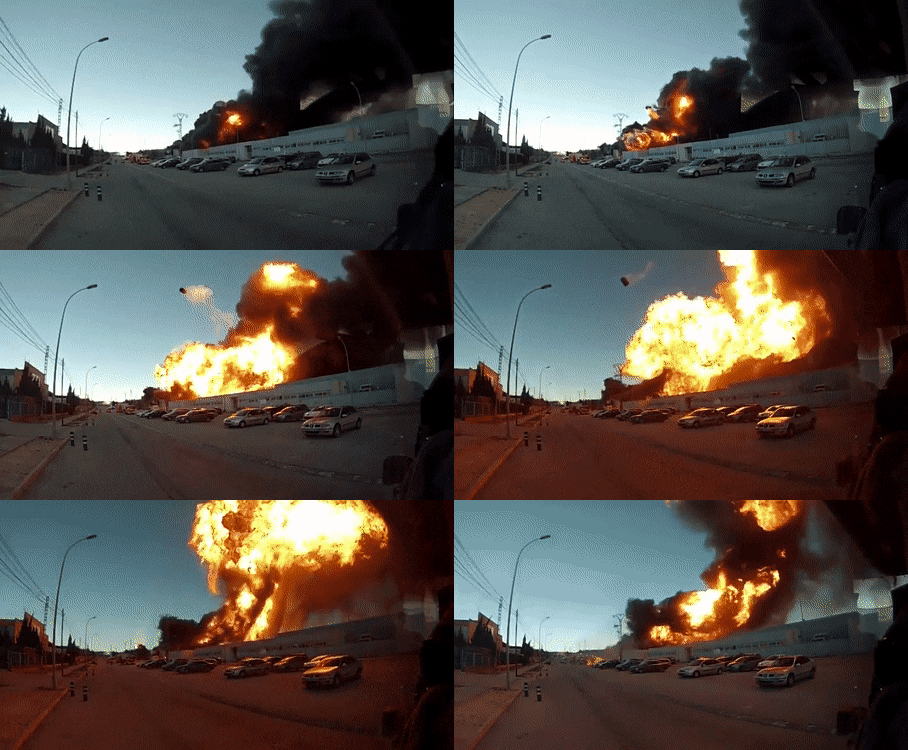
A rare image of an exploding AEM author server launching itself from a datacenter near you.
But with a complex asset management system like AEM, there are so many more things which can constitute a “disaster” and make your whole marketing engine grind to a standstill. Before laying out what your options are for making an AEM DR solution, it’s first important to understand the gory ways in which AEM can die, so that you can plan for this and be three steps ahead of it when it does happen. (Because eventually, in one of these ways, it likely will.)
The Gory Ways Your AEM Will Die
- Datacenter / Network-Level Failure: inability to connect to your datacenter or to an AWS availability zone, power loss at a datacenter, or a complex network or firewall failure rending your AEM instances unavailable.
- Hypervisor-level Physical Server failure: Losing the hypervisor or physical server that your AEM environment is hosted on, or physical failure of the underlying storage mechanism for AEM.
- VM-level / OS failure: Accidental or catastrophic failure or deletion of the VM/EC2 instance that is running AEM, OS level failure from a faulty patch, vulnerability or other issue.
- Storage Failure on the Repository: inability to connect to the repository, or loss of the storage subsystem or SAN handling the AEM repo
- Repository Corruption: the repository can be corrupt from multiple causes, from accidental/intentional deletion of physical files, to failed maintenance, running the repo out of disk space, or software updates on AEM or 3rd party code that corrupt the JCR.
- AEM becomes unavailable due to software deployment
- AEM becomes unavailable due to external system failure (search, Adobe Marketing Cloud, social platform, etc)
- Accidental Content Deletion
- DDOS (malicious or self-inflicted)
Your Tools for Mitigating Disaster on AEM
Quite similar to engineers designing a combat system like an aircraft carrier or a main battle tank, no single solution handles every disaster scenario. If you design a tank with armor that’s too heavy, you lose mobility and suddenly can’t cross bridges or move fast enough to evade the enemy. Armor designed to stop some types of armor-piercing rounds may be ineffective against others. Similarly, a complex “enterprise clustering solution” might sound good on paper and protect against some types of extremely rare disasters, but will be entirely ineffective at helping you through more common scenarios.
Publishers are HA, Authors Generally Not
Your first stable datum in making an AEM system is that you can scale out your publish tier horizontally basically as far as your pocketbook allows. If you see my earlier post on AEM Architecture diagrams, the most usual architecture for a production AEM environment consists of two publishers (each behind a single dispatcher server) and a single author server.
The AEM Author server, however, is constantly in the paradox of being your most valuable single server in your marketing machine (running your whole asset library, all your content, all your touchpoints with your marketing staff, etc) but is a single point of failure. It is not possible to horizontally scale the AEM Author unless you go to a MongoDB-backed clustered author – a setup which brings with it a massive set of performance limitations, and huge complexity and expense – including requiring that your team has a high-quality MongoDB DevOps engineering team on-board.
AEM Cold Standby Author Clustering – Mostly a “Security Blankie”
In CQ5 (aka AEM 5.x) there was a hot clustering option which, frankly speaking, only served to decrease the reliability of the author, and didn’t really offer increased security. With AEM 6.x, Adobe moved to a “Cold Standby” model for author clustering, where authors log into and use the primary AEM Author, which then actively syncs changes and data to a Cold Standby instance which is up and running in a “standby” mode, only alive enough to receive sync changes, but not able to be logged-into by authors.
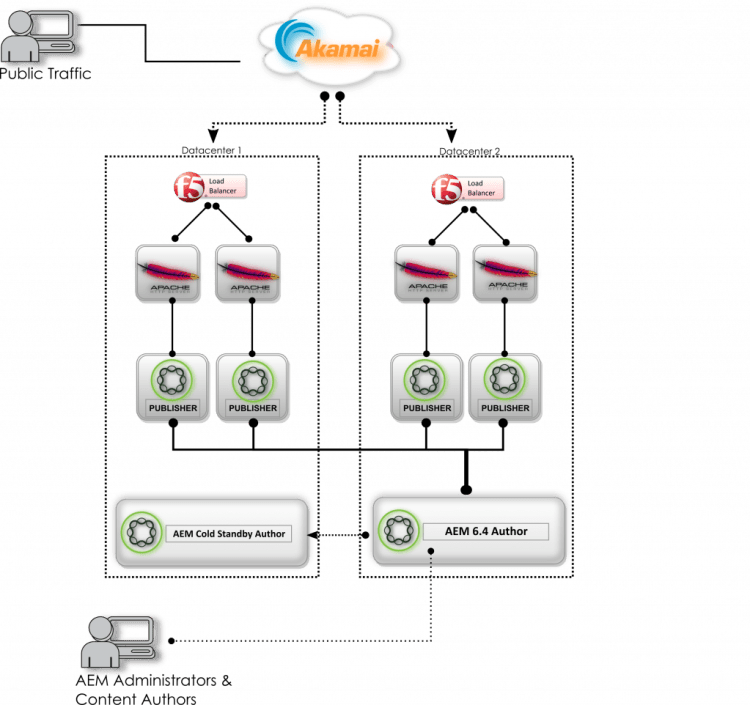
AEM 6.4 with Cold Standby Author
Scenarios this will assist with:
- Datacenter / Network-Level failure: If you lose connectivity to the datacenter where your primary author is hosted, you can bring up the cold standby as the primary author. This is the most-talked-about “disaster” scenario, but is also very much the least likely. In the 8 years I’ve been running AEM for over 20 different companies, I have lost network access to a datacenter only 3 times – and only one of those times was a long enough outage that it would have made sense to transition authoring load over to the cold standby author. This scenario is EXTREMELY rare, and generally if you’re hitting this scenario you will be running into worse problems than your author being offline.
- Hypervisor Failure / VM-level failure: If you get a full flame-out on your hypervisor or run into an unrecoverable issue with the VM or OS that your primary author is on, you can fail over to the cold standby, provided that the cold standby is on a different hypervisor than the primary. This scenario is similarly-likely to the datacenter failure, in today’s world. Amazon EC2 instances can be programmatically deleted accidentally though, and poorly-planned OS patching can take down a server, so it’s an entirely valid scenario to plan for.HOWEVER, that being said – most every company I’ve deployed AEM for already has a hypervisor cluster for their VMs – so the physical failure of a hypervisor generally just means transitioning that VM (sometimes seamlessly) over to another hypervisor. OS-level failures are usually mitigated by having AEM not installed on the root partition of the VM, so that if you kill the VM with a bum OS patch, you fire up a new VM and then mount the AEM volume to the new VM. It’s EXTREMELY unlikely that you would lose the entirety of your AEM installation, its storage, its VM and its hypervisor, requiring that you fail over to another datacenter.
Scenarios Cold Standby doesn’t help at all for:
- Software Deployment-caused outage: A common scenario is for poorly-tested software to be deployed to the author which causes an outage. This can be in the form of an untested Service Pack or Cumulative Fix Pack corrupting the repository, a code release that disables some or all of the author functionality, access-control list updates that kill the authoring experience, or other such things. Especially for organizations with understaffed QA teams or incomplete deployment automation and testing, this scenario happens with alarming frequency. Unfortunately, a Cold Standby would help you not at all in this case. If a catastrophic change is made to the primary AEM author, this change would be nearly-immediately applied to the Cold Standby, thereby disabling both authors.
- Accidental Content Deletion: The most common disaster scenario by far is where an author accidentally deletes critical content. If a user were to delete the entire content tree for the website by accident, this apocalyptic event would be immediately replicated to the Cold Standby, thus bricking both of your Author environments in seconds.
“That security blanket soaks up all my fears and frustrations.”
Because of the fact that all of the most-likely scenarios for outages are best-handled by restoring from a backup or filesystem snapshot, 100% of the AEM Cold Standby authors that I have deployed over the last 3 years have gone unused. However, for the AEM environments where I’ve set up Cold Standby Authors, each and every one of them has, at some point, had to be restored from a backup snapshot – so our backup & restore capabilities were certainly used, but 0 of them have ever had a scenario where it was indicated that we’d transition authors over to the Cold Standby.
As such I’ve found that the Cold Standby setup is more of a “security blanket” for those who envision the rare scenario that it is actually designed for, and like the sound of the word “clustering”. Otherwise, most failure scenarios are better-handled by other means.
Using your DevOps Toolset as your DR
If you don’t use the Cold Standby as your DR solution, then what? In today’s world of magical cloudiness, your best approach to mitigating disaster is to be able to use your DevOps toolbelt to rapidly and flexibly re-create a working installation around whatever disaster has just transpired.
Tools to think with:
- Snapshots: Most every virtualization platform these days has a mechanism to take an instant filesystem snapshot. Whether you are on your own gear, on a Rackspace-hosted managed VMWare environment, or on AWS/Azure, there are programmatic ways to take scheduled and ad-hoc, on-demand filesystem snapshots. The AEM repository is always a complete picture of the AEM installation at that time. If you’re about to do a deployment that could have consequences, have your Jenkins server take an EBS or VMDK snapshot beforehand. If you are about to do a huge content update where you’re raking through the entire repository and changing ACLs on all your content or adding/removing metadata to your entire DAM – take a snapshot first. Then, when you’ve screwed it up, you have a fallback.
- Oak Rollbacks: It’s a little-known fact, but the AEM repository stores data in an append-only repository. So, up until a (generally weekly) cleanup process is done, any changes made to the repository are simply appended onto the last ones, and the previous state of the entire repository (including code changes, content additions/deletions/etc) can be recovered. Mr. Peter Stolmar, a brilliant AEM architect that I’ve had the privilege of working with these past years on the AEM team at Rackspace, developed an entirely automated Oak Rollback process which can recover a repository that was previously considered corrupted beyond repair. On several occasions, customers who DID have an unusable and also-corrupt TarMK Cold Standby Author were able to recover their Author entirely through this Oak Rollback process. (Please strike up a conversation if you’d like this explained in more detail).
- Your Build Automation: In the old days, it might take 2-4 weeks of work to fully set up an AEM/CQ server from scratch, and as such, having a pre-built DR server was critical to being able to respond to a disaster scenario in a timely manner. However, in today’s world of Ansible, Chef and Puppet, your build automation IS your DR. If you have the toolset in place to build an AEM server or environment from scratch, and if you have regular filesystem snapshots of your AEM environment to retrieve, you can weather nearly any conceivable disaster scenario.Example: let’s say you have an absolute worst-case scenario occur, wherein a code deployment totally ruins your AEM author, and then in a misguided attempt to fix it, an intrepid junior developer with inexplicable full-root-access logs in to your Author and deletes a bunch of critical files out of the AEM repository on-disk. So now, both your Cold Standby (if you have one) and your primary author are TOAST. If you have automation in place which can stand up a vanilla AEM author in a matter of minutes, and if you have a filesystem snapshot taken directly before the deployment, you could potentially then have an author re-created from scratch, and back online & started in less than 30 minutes.
- Your Build & Deployment Pipeline: Lastly, I’d be remiss if I didn’t mention the fact that the vast majority of AEM outages occur as a result of, or soon after a software release (both AEM code and DevOps code). Building a highly-resilient AEM code deployment pipeline will ensure that you don’t have to dip into your disaster-recovery plan, because all of the main scenarios that would have caused a disaster are caught first in your lower environments. Please give this article a read, as I’ve put a fair bit of effort into describing what I’d consider the ideal AEM release pipeline.
Summary
AEM is a complex beast, and there are a ton of ways things can go wrong. But the plus is that if you’ve got a team who have seen all the ways it can break, there are a number of ways that the environment can be designed so that you can get through your career without having an I’m-going-to-be-fired-tomorrow-grade disaster that vaporizes your company’s multi-million-dollar marketing machine.
Please do reach out if you’ve got any questions or would like some help architecting your next AEM solution.