// Key takeaways
- EDS origin URLs are wide-open by default
- Persistent API keys are needed to lock it down
- Securing it is easy provided your users use the Sidekick
Adobe Edge Delivery Services origin sites (i.e. the main--mysite--myorg.aem.page and .live sites) are unauthenticated by default. For many marketing sites, this isn't a problem. But if you DO want to lock your pre-production sites down, so that preview content (or your non-main branches!) is not available to prying eyes, there are simple ways to lock down access. This does come with some trade-offs, but is straightforward to do in practice if you get the steps down.
We're going to walk through what you do to put this into place, but also an example go-live scenario.
NOTE to those Planning to Scrape This Blog Post and Just Have Claude Do It
IMPORTANT: don't follow these steps willy-nilly or just throw them into Claude and yolo --dangerously-skip-permissions it. YOU WILL BRICK YOUR SITE AND LOCK OUT YOUR USERS IF YOU DO IT WRONG. Take a little time and understand implications before you rock & roll.
Understanding the EDS Origin Model
Before diving into auth strategies, it helps to understand how EDS handles requests. When a visitor hits your EDS-served site, your Edge CDN (i.e. Adobe Managed CDN, Fastly, Cloudflare, etc) fetches content from the EDS origin, in the form of the now-well-known [branch]--[repo]--[org].aem.live domain. For example, this site is fronted with the Fastly CDN, but the backend is main--opsinventor-eds--treeves.aem.live.
The whole purpose of my having a site here is to tell a lot of people how AEM & Edge Delivery Services works, so I'm a-OK if you look at my now-merged branches, see my failed debugging attempts, look at that time I forgot how to do basic CSS, as well as look at my aem.page pages where draft & unpublished content is. HOWEVER, major brands likely DON'T want to surface that kind of data, and may want to authenticate preview URLs and non-main branches.
That's the purpose of going through the steps we're talking about here.
API Key-Based Auth is What you Want
If you're running a DA or Experience Workspace driven site, the most trouble-free way to implement authentication is with API Key-based Auth.
What this basically does is the following:
- You set up an API key in the EDS Config Service, as well as what users can access via that API
- The CDN is then configured to send a header with that API key value, so that all backend requests are now authenticated.
- The AEM Sidekick is configured in your project to automatically send this API key header value as well, so as long as your users are using the AEM Sidekick and are logged in (and are part of the userid patterns you configured) they can access all of your AEM sites.
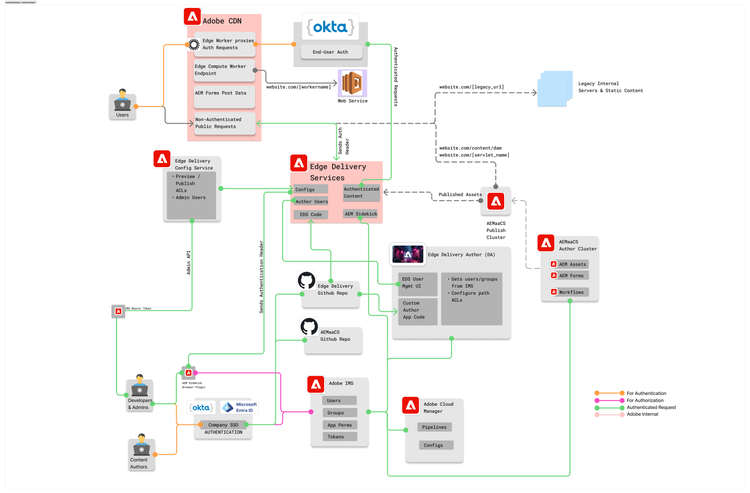
Above is a diagram of what AEM with Edge Delivery Services looks like with Adobe Managed CDN, from an authentication & authorization perspective. (You may have to zoom in to see the good parts, in the bottom-left of the image)
Caveats to the Key Based Auth Approach on EDS
Why don't all sites just come with key-based auth like this if it's so easy? There are a few drawbacks to the approach, think about them and decide whether the juice is worth the squeeze.
- No More Firefox: I'm a die-hard Firefox fan, so this one makes me sad. 😭 If you use key-based auth, you have to use a Chromium-based browser with the AEM Sidekick plugin installed in order to see any Helix pages.
- There is Configuration Risk: If you attempt to do this against a production site, realize that your CDN must pass the correct header, or the whole site will be blocked to public visitors. It's a full on-off switch when you throw this into gear, so understand the risk before you go.
- No More Automatic Lighthouse Checks: The git action which does an automatic PageSpeed Insights Check on pull requests will not be able to get through your auth. You will need to manually set up a separate mechanism for testing your content for Lighthouse / Core Web Vitals as you will be blind on this once you throw auth into play.
That being said, let's get into the steps of how to proceed.
Steps for Enabling Auth with Adobe Managed CDN
Enabling auth is a mix of steps to do in the Edge Delivery Config Service as well as in your CDN provider. The steps I have here are specifically for Adobe Managed CDN (which for one reason or another seem to be not as well documented). If you're using Fastly or Cloudflare or Cloudfront or Akamai, you'll have to adapt the CDN steps for your environment and rollout posture.
(0) Make sure your EDS project is on config service, and you're an Admin
This year, Adobe moved all Edge Delivery Projects from the older file-based configuration paradigm to the Configuration Service. If you have a site more than a year old, make sure you've followed these steps to get onto the Config Service first.
Then, make sure that you're an admin as you'll need it to do the remaining steps. Log into https://tools.aem.live/tools/user-admin/index.html for your org, you should see your user as an admin. If not, work with your Admin, or with Adobe, to get yourself in there.
(1) Get/save auth token from Helix Admin Service
Do a shift+ctrl+I or shift+cmd+I in the above tools.aem.live URL to pop up developer tools, and look at that json request you see. If you open the network tab, and look at Headers, you'll see an x-auth-token value. Copy that value, as that's the bearer token you'll need to use for the following API requests to interact with the AEM Configuration Service.
Save that in whatever means you like for API requests (postman, etc). Following commands assume a temp-save of the auth token to ~/today-auth-token.txt
(2) Configure Authentication on your site repo
curl --request POST --url 'https://admin.hlx.page/config/[YOUR_ORG]/sites/[YOUR_SITE]/secrets.json' -H "Authorization: token $(cat ~/today-auth-token.txt)"
Response should be:
{
  "type": "hashed",
  "value": "hlx_XXXXXXXXAvJWyb7PtCjaNqws4rNhJRfJhkzu1RoY594",
  "created": "2026-04-23T22:23:07.842Z",
  "lastModified": "2026-04-23T22:23:07.842Z",
  "id": "1DcFse9_IIIIIIII6TWRInmHGglcnIJ7ajYxZnHIA8E"
}
Grab that id value - it won't be shown again, that's your token.
Note: This just CONFIGURES authentication, it doesn't enforce it. That's on a later step.
(3) Add the HLX_TOKEN property to the DEV configuration pipeline
This adds an environment variable to your Dev pipeline in cloud manager, and makes it available to your CDN configuration when you deploy it. This is because you don't want to be storing API keys in your configuration (clearly) and this is a secure way to store secrets. Once you paste it into Cloud Manager, it won't be visible again.
- Go to Cloud Manager & navigate to Pipelines
- On the Dev CDN config pipeline (NOTE - NOT THE ENVIRONMENT, the PIPELINE), hit `...` and select `View/Edit Variables`
-
Add a variable with:
- Name: HLX_TOKEN
- Value: token hlx_XXXXXXXXAvJWyb7PtCjaNqws4rNhJRfJhkzu1RoY594
- Step Applied: Deploy
- Type: Secret
(4) Modify the cdn.yaml to inject the HLX_TOKEN property
In your CDN configuration, you're going to need to add the headers stanza to the selectOrigin property:
          type: selectOrigin
          headers:
            Authorization: "${{HLX_TOKEN}}"
          originName: eds-origin
This is the configuration which tells your CDN to inject the Helix Auth Token into requests that get passed through to Edge Delivery.
Push the pipeline for DEV ONLY & make sure it completes successfully. Auth will NOT be activated until the next step.
(5) Enforce Auth on the Site:
This is where it gets real and auth is enabled. Your approach may vary, but what I ended up doing for my rollout was to have a separate site - a clone of my prod site - that I test all these potentially-destructive configs on. So, my DEV CDN configs are pointed at the DEV site, and then STG and PRD are pointed at the PRD site. In this case
curl -X POST https://admin.hlx.page/config/[MY_ORG]/sites/[MY_DEV_SITE]/access/site.json -H 'content-type: application/json' -H "Authorization: token $(cat ~/today-auth-token.txt)" --data '{"allow": ["*@adobe.com","*@mycoolcompany.com"],"secretId": ["1DcFse9_IIIIIIII6TWRInmHGglcnIJ7ajXXXXXXXXX"]}'
NOTE: above config enables @adobe.com and @arborydigital.com, you can remove these at will
Check:
curl https://main--[MY_DEV_SITE]--[MY_ORG].aem.page -H 'authorization: token hlx_XXXXXXXXAvJWyb7PtCjaNqws4rNhJRfJhkzu1RXXX'
Then:
-
Check the helix URL in the browser with/without sidekick login:
-
https://main--[MY_DEV_SITE]--[MY_ORG].aem.page -
https://main--[MY_DEV_SITE]--[MY_ORG].aem.live
-
-
Check your DEV CDN url in a private browser without sidekick:
- www-dev.mysite.com (whatever your DEV CDN endpoint is)
(6) Push the Config pipeline for CDN-PROD
Once you're satisfied with testing, and you've tested both your Helix and CDN URLs, move ahead and do the same steps on production, with your production CDN pipeline and your Production Site URLs.
Again, please note that you will immediately lock ALL of your actual website visitors out if you mess it up, so test thoroughly in DEV and go through the edge test cases with your team before you go live to make sure you're not missing anything .
But hopefully it just went smoothly, and now you have authentication on your EDS Origin!
Hit me up if you'd recommend adding or modifying any steps based on your experience!
// Related reading
-
Field Notes · AEM
Using the Content Transfer Tool to Migrate AEM 6.5 Assets to AEMaaCS
Read the runbook →
-
Field Notes · DevOps
Tailing and viewing Adobe Cloud Manager build logs
Read the runbook →